Local resolver
Deploying the Whalebone Aura as a local resolver brings the advantage of visibility of local IP addresses that send the actual requests. If deploying locally is not a suitable option for you, check out the Cloud deployment.
Whalebone resolver is based on the implementation of Knot Resolver developed in the CZ.NIC labs.
Local resolver system requirements
Hardware and software requirements
Local resolver is supported on solely dedicated physical or virtual machine running a supported operating system and Docker engine. Running resolver on unsupported versions of operating system and/or Docker or with other services might lead to incorrect behavior or issues with service or resolution. Please be aware that not-compliance of these requirements makes troubleshooting more complicated in case of issues with the product.
Please perform regular checks and maintain the resolver’s operating system and Docker engine versions up-to-date to ensure stability of the service.
Operating system
Warning
Please note that Whalebone only supports deployments without desktop environments such as GNOME, KDE or Xfce as those can impact available memory and DNS processing on the server.
The operating system must support the amd64-bit architecture.
Whalebone requires an actively maintained operating system distributed by one of the following operating system publishers:
Docker
Tip
The installation script will install Docker engine. There is no need to install it manually prior to the installation.
Whalebone supports and is tested on versions of Docker that are supported by the community. See the supported versions here.
File systems
ext4
xfs only with d_type support (ftype=1)
CPU
The CPU supports the amd64-bit architecture and the x86-64-v2 instruction set. See below for instructions on how to verify if x86-64-v2 is supported:
Ubuntu, Debian:
Execute
/lib64/ld-linux-x86-64.so.2 --help.Check if you see
x86-64-v2 (supported, searched)in the terminal.
Red Hat Enterprise Linux, CentOS Stream:
Execute
/lib/ld-linux-x86-64.so.2 --help.Check if you see
x86-64-v2 (supported, searched)in the terminal.
Disk space
At least 70 GB of free disk space in the /var directory.
LMDB databases – domain, policy, IP range, and deny lists databases used for Threat, Content and Legal (regulatory) blocking.
Database updates – both the current and newly downloaded database versions are temporarily stored during the update process.
System services – Docker images, operational data and logs of individual resolver components.
Important
Starting with version 3.2.0, the resolver dynamically utilizes available storage for operational data, service logs and LMDB databases (up to 50% of available disk space is pre-allocated for LMDB ). The 70 GB requirement represents the minimum recommended capacity to ensure stable operation and accommodate future database growth. During database updates, both the current and newly downloaded database versions must be stored simultaneously to prevent any interruption of protection. Insufficient free disk space may cause the resolver process to terminate, resulting in restart loops and the loss of DNS protection.
Hardware sizing recommendations
The following table provides hardware sizing recommendations based on the expected DNS query load and number of clients per server. Whalebone recommends provisioning at least two servers for redundancy and high availability. Both servers should meet the minimum hardware requirements listed in the table below to handle the expected load even in the event of a failure of one of them.
Number of DNS queries per second |
Number of clients |
Number of CPU cores |
RAM (GB) |
Free disk space (GB) |
|---|---|---|---|---|
4,000 |
8,000 |
2 |
4 |
80 |
8,000 |
16,000 |
4 |
8 |
80 |
16,000 |
32,000 |
8 |
16 |
80 |
40,000 |
80,000 |
20 |
40 |
80 |
Network requirements
Tip
Whalebone uses regional cloud services to optimize the communication between clients and the cloud components. The region to which the customer’s resolver is connected can be found in the URL of the tenant in the Admin Portal. For example, if the URL is https://portal.eu-01.whalebone.io/en/client-123456, the tenant is registered in the EU-01 region. This is useful when setting up the firewall rules in the customer’s network. Some customers may be using the Legacy environment, in which the tenant URL will be https://portal.whalebone.io/en/client-123456.
Local resolver needs the following egress ports opened:
Direction |
Protocol |
Port |
Destination Domain |
Description |
|---|---|---|---|---|
Outbound |
UDP |
53 |
Any |
DNS resolution |
Outbound |
TCP |
53 |
Any |
DNS resolution |
Outbound |
TCP |
443 |
resolverapi.whalebone.io |
Database updates |
Outbound |
TCP |
443 |
resolverapi.eu-01.whalebone.io |
Database updates |
Outbound |
TCP |
443 |
resolverapi.apac-01.whalebone.io |
Database updates |
Outbound |
TCP |
443 |
resolverapi.am-01.whalebone.io |
Database updates |
Outbound |
TCP |
443 |
stream.whalebone.io |
Realtime database updates |
Outbound |
TCP |
443 |
stream.eu-01.whalebone.io |
Realtime database updates |
Outbound |
TCP |
443 |
stream.apac-01.whalebone.io |
Realtime database updates |
Outbound |
TCP |
443 |
stream.am-01.whalebone.io |
Realtime database updates |
Outbound |
TCP |
443 |
logger.whalebone.io |
Logging stream |
Outbound |
TCP |
443 |
logger.eu-01.whalebone.io |
Logging stream |
Outbound |
TCP |
443 |
logger.apac-01.whalebone.io |
Logging stream |
Outbound |
TCP |
443 |
logger.am-01.whalebone.io |
Logging stream |
Outbound |
TCP |
443 |
agentapi.whalebone.io |
Resolver management |
Outbound |
TCP |
443 |
agentapi.eu-01.whalebone.io |
Resolver management |
Outbound |
TCP |
443 |
agentapi.apac-01.whalebone.io |
Resolver management |
Outbound |
TCP |
443 |
agentapi.am-01.whalebone.io |
Resolver management |
Outbound |
TCP |
443 |
transfer.whalebone.io |
Support log collection |
Outbound |
TCP |
443 |
portal.whalebone.io |
Admin portal |
Outbound |
TCP |
443 |
portal.eu-01.whalebone.io |
Admin portal |
Outbound |
TCP |
443 |
portal.apac-01.whalebone.io |
Admin portal |
Outbound |
TCP |
443 |
portal.am-01.whalebone.io |
Admin portal |
Outbound |
TCP |
443 |
harbor.whalebone.io |
Resolver updates |
Outbound |
TCP |
443 |
harbor.eu-01.whalebone.io |
Resolver updates |
Outbound |
TCP |
443 |
harbor.apac-01.whalebone.io |
Resolver updates |
Outbound |
TCP |
443 |
harbor.am-01.whalebone.io |
Resolver updates |
Outbound |
TCP |
443 |
download.docker.com |
Installation process |
Outbound |
TCP |
443 |
data.iana.org |
DNSSEC keys |
Outbound |
TCP |
443 |
hooks.slack.com |
Support log collection |
Warning
Without communication on port 443 to the domains listed above, the resolver won’t be installed at all and the installation script will abort.
The main function of the resolver to get queries from the customers and answer back to them the answer requires certain ports to be opened on the resolver for the traffic originating from the client subnet or coming to the customer interface.
Direction |
Protocol |
Port |
Source IP/Domain |
Description |
|---|---|---|---|---|
Inbound |
TCP+UDP |
53 |
Customer’s subnet range(s) |
DNS |
Inbound |
TCP |
853 |
Customer’s subnet range(s) |
DNS over TLS (if used) |
Inbound |
TCP |
443 |
Customer’s subnet range(s) |
DNS over HTTPS (if used) |
The Blocking Pages are being hosted directly on the Resolvers so the IP addresses that are advertised to the clients must be used. The clients will then be redirected to the IP address of the resolver upon blocking. It is advised to allow only subnet(s) assigned to customers or trusted networks, otherwise it can be misused for various attacks or unauthorized users.
Direction |
Protocol |
Port |
Source IP/Domain |
Description |
|---|---|---|---|---|
Inbound |
TCP |
80 |
Customer’s subnet range(s) |
Redirection/Blocking page |
Inbound |
TCP |
443 |
Customer’s subnet range(s) |
Redirection/Blocking page |
The resolver’s processes need to communicate on localhost. In case some firewall is in place please make sure that the traffic is allowed, i.e. iptables -A INPUT -s 127.0.0.1 -j ACCEPT
Direction |
Protocol |
Port |
Source IP/Domain |
Description |
|---|---|---|---|---|
Inbound |
TCP |
ANY |
127.0.0.1 |
Resolver’s processes communication |
Note
For hardware sizing estimation of large ISP or Enterprise networks feel free to contact Whalebone. Whalebone local resolver will need approx. twice the RAM and CPU than usual resolver BIND or Unbound.
Installation of a new local resolver
You can watch step-by-step video guide about the installation procedure here.
In menu Resolvers press the button Create new. Choose a name (identifier) for your new resolver. The input is purely informative and won’t affect the functionality. Once you’ve entered the name, click Add resolver button. After clicking the button an informative window will pop up with list of supported platforms and the one-line command for the installation. Copy the command and run on the machine dedicated for the local resolver. The command will run the installation script and will pass the one time token used for the resolver activation. The same command can’t be used repeatedly.
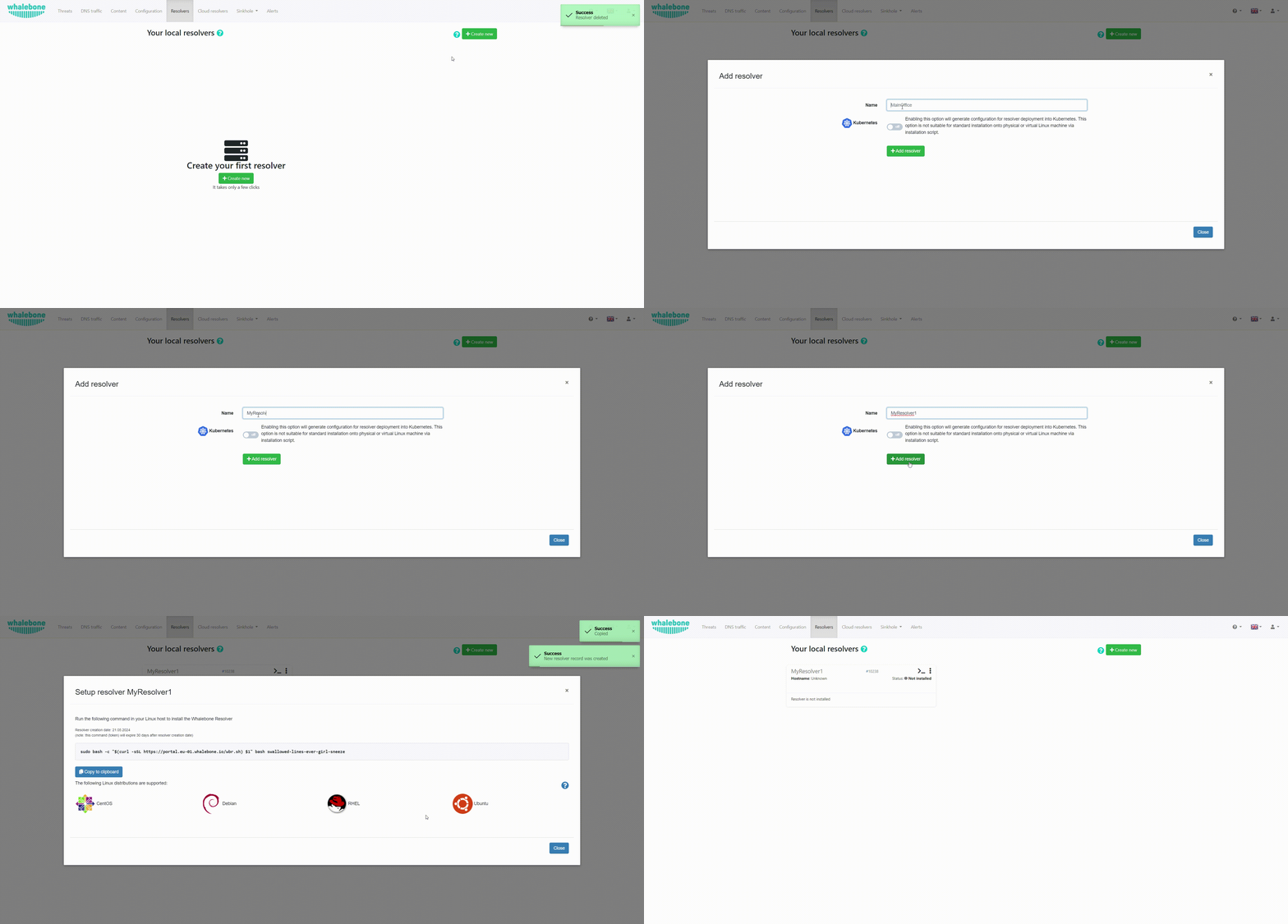
Once the command is run the operating system is being checked and requirements installed. Script will inform you about the progress and it creates a detailed log named wb_install.log in current directory.
Successful run of the installation script is ended with the notification `Final tuning of the OS` with value [ OK ]. Right after the installation also the initialization takes place and it could take several minutes before the resolver starts the services.

Important
The resolver’s processes need to communicate on localhost. In case some firewall is in place please make sure that the traffic is allowed, i.e. iptables -A INPUT -s 127.0.0.1 -j ACCEPT
Verifying the installation
Whalebone resolvers come with a set of testing domains for the verification of the installation and the Security filtering. These domains can be used in order to ensure that you are effectively using a Whalebone resolver:
http://malware.test.attacker.onlinehttp://c2server.test.attacker.onlinehttp://spam.test.attacker.onlinehttp://phishing.test.attacker.onlinehttp://coinminer.test.attacker.online
Upon visiting these domains a blocking page similar to the following should be presented:
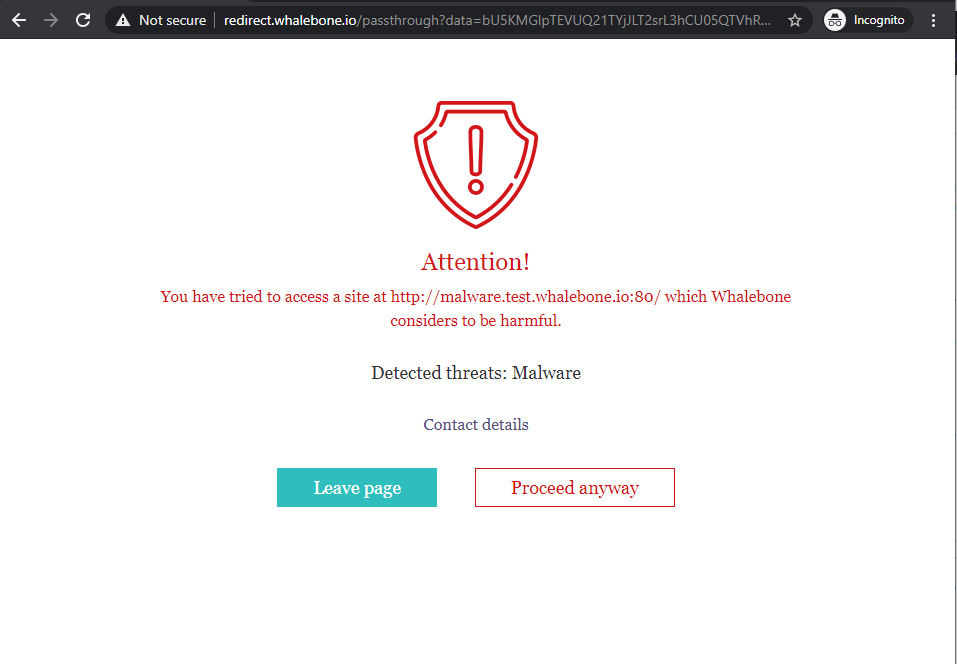
Blocking Page - Whalebone Resolver is being used.
In case you come across the page below, it means that the request was not blocked and thus a Whalebone resolver is not being used. Please review your settings and if the issue persists, please contact support.

Blocking Page - Whalebone Resolver is not being used.
Securing your resolver
Upon initial installation, the resolver is configured as an open resolver. It will respond to any request sent to it regardless of where the request originated from. This is quite comfortable in terms of availability of the services, but could also be a risk if the service is available from the outside networks. Please make sure you limit the access to the local resolver on port UDP/53 and TCP/53 from the trusted networks only, otherwise it can be misused for various DoS attacks.