Threats
Threats are special events in which a DNS request for a domain is present in the reputation database. There are two types of actions when a threat is detected. The first is to audit the event, which only logs the domain; however, access is still possible. The second action is a block that prevents requests to the malicious site and redirects the user to the blocking page.
You can watch a step-by-step video guide here.
Threats are categorized by their types. The categories are:
Blacklist
C&C
Coinminer
Compromised
Malware
Phishing
Spam
How to Search for Events Blocked by a Deny List
Tip
The Deny list category is a custom list maintained by the customer’s administrators to block domains on demand. Blacklist is part of the Whalebone threat intelligence data for known domains that host multiple threats, or when the exact category could not be determined.
You can select the deny list category in the pie charts or in the log list under the Threat Categories column. Another option is to click the Filter button and set the Deny list filter to Yes.
How to Analyze a Domain
To learn more about domain analysis, scoring of malicious domains, domain categories, or what external sources know about them, watch the step-by-step video here.
How to Report “False Positive”
In some cases, the score of a domain may be wrong. If you believe a domain should not be blocked but is, you can report it as misclassified using the Report False Positive button to initiate a domain review request.
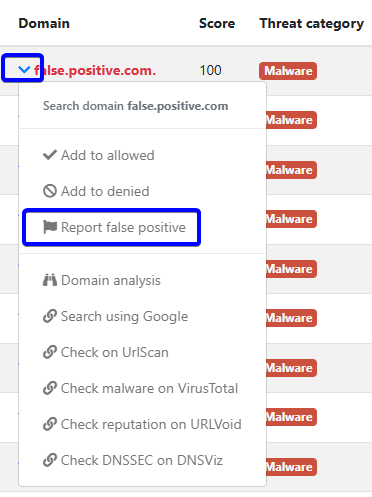
Report false positive
Filtering Options
Client IP: The source IP address that made the DNS request or incident
Device ID: The unique identifier of the device that made the DNS request or was involved in the incident.
Domain: The domain in the DNS query
Action: The action that the resolver took with that specific query, such as
block,allow, andauditThreat category: The category of the threat, such as
malware,phishing, orc&c(command and control)Threat name: The specific name of the threat, which may provide more detailed information about the nature of the threat
Deny list: Enable or disable the filter for domains that are present in deny lists
Country code: The country code associated with the client’s IP address, which can provide insights into the geographic location of the source of the DNS request or incident
Resolver ID: The unique identifier of the resolver that processed the DNS request or was involved in the incident, which can help identify patterns or specific resolvers that may be associated with certain types of threats
Tip
The device ID has been assigned by the customer using the Retail API. The list of devices is in the Retail section of the portal.
CSV Export
The CSV data contains the following details:
date
action
client’s IP address
device name
country
domain
score
threat category
threat name
resolver’s name