Syslog Integration
Whalebone’s syslog integration provides a reliable, real-time export of security and operational data directly from each Whalebone local resolver to industry-standard SIEM tools such as Splunk, Elastic, or any compatible external log management solution. This capability enables organizations to centralize log ingestion, correlate DNS security events with other data sources, and build automated detection and response workflows. By streaming events in standard syslog format, it ensures seamless integration into existing monitoring infrastructures while supporting compliance, auditing, and advanced threat analysis requirements.
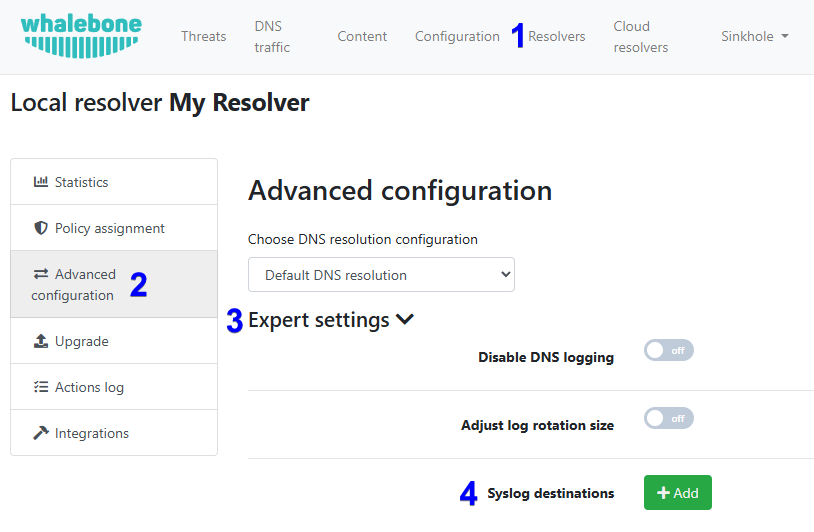
Syslog integration can be enabled on the Admin Portal under Resolvers > Edit resolver > Advanced Configuration > Expert settings.
Requirements
The resolver with an enabled syslog integration can open a connection to the destination external log management solution on the port specified in the resolver’s settings. The protocol is UDP by default.
Log files
Administrators have the ability to specify which type of data they want to export. The description of individual log files is below:
content.log: Domains blocked by the content filter.
debug.log: Additional debugging data. This file contains data only when the debug mode is enabled by a Whalebone technician.
metrics.log: Metrics related to the operating system, disk usage, CPU usage, memory usage, Docker run-time statistics, and individual Whalebone services.
passivedns.log: All DNS traffic.
whalebone.log: All detected threats.
agent/agent-docker-connector.log: List of Docker removed containers. Docker containers are removed/replaced during updates or configuration changes.
agent/agent-lr-agent.log: Communication overview and detailed configuration obtained from Whalebone cloud.
agent/agent-main.log: Health check messages related to the lr-agent service.
agent/agent-status.log: The status of the listener, which receives configuration updates from Whalebone cloud.
Note
The most important log files are content.log, passivednslog, and whalebone.log. The rest is mainly for troubleshooting or debugging purposes.
Examples
Here are some examples of the most frequently users logs content.log, passivedns.log, and whalebone.log files:
content.log
{
    "timestamp": "2025/06/12 06:44:27.049917",
    "action": "block",
    "server_ip": "192.168.0.10",
    "client_ip": "192.168.10.41",
    "domain": "whalebone.com",
    "ioc": "whalebone.com",
    "identity": "wb-default-policy",
    "mobile_client_id": "",
    "device_id": "",
    "content_types": [
        "social-networks"
     ],
    "legal_types": [],
    "app_blocked_intersect": [],
    "scheduled_filter": [],
    "scheduled_internet": "false",
    "policy_name": "",
    "policy_group_id": "",
    "policy_tags": "",
    "pin": "0",
    "region": "eu-01",
    "segment_id": "",
    "brand_id": "",
    "subscription_id": "",
    "answer": "SINKHOLE_IP",
    "sinkhole_type": "1",
    "port": "56121",
    "type": "A",
    "rcode": "0",
    "matrix": {
        "accuracy_audit": "false",
        "accuracy_block": "false",
        "content": "true",
        "advertisement": "false",
        "legal": "false",
        "whitelist": "false",
        "blacklist": "false",
        "bypass": "false",
        "apps_blocked": "false",
        "apps_allowed": "false"
    }
}
Fields in the content.log file with explanations and possible values:
timestamp [string] : The date and time when the event occurred.
- action [string]: The action taken by the resolver.
“block”: The DNS request was blocked, and the client received a response with the blocking page’s IP address.
“allow”: The DNS query was allowed based on the user’s request to bypass the blocking the page.
server_ip [string]: The IP address of the resolver that processed the DNS request.
client_ip [string]: The IP address of the client that made the DNS request.
domain [string]: The domain name that was requested.
ioc [string]: The Indicator of Compromise containing the specific domain that triggered the security event.
identity [string]: The internal identifier for IP address or IP range that is tied to any policy (e.g. “wb-default-policy” or any other unique name of the policy).
mobile_client_id [string]: The identifier for a mobile client we parse from TLS, used in Home Office Security.
device_id [string]: The ID of the device using Home Office Security.
- content_types [array]The content categories that the domain falls under.
“porn”
“gambling”
“sexual-content”
“weapons”
“child-abuse”
“drugs”
“racism”
“terrorism”
“violence”
“audio-video”
“chat”
“games”
“social-networks”
“advertisement”
“coinminer”
“doh”
“p2p”
“tracking”
“vpn-proxies”
“freemail”
“alcohol-cigarettes”
legal_types [array]: The legal restriction identifiers that triggered the block.
app_blocked_intersect [array]: The specific applications that were blocked with the current request (e.g., “discord”, “netflix”).
scheduled_filter [array]: The content categories that were queried and have scheduled allowance.
scheduled_internet [string]: The boolean value indicating if internet access is currently restricted based on a predefined schedule.
policy_name [string]: The name of the chosen policy for request.
policy_group_id [string]: The ID of the chosen policy for request.
policy_tags [string]: The label of the chosen policy for grouping and filtering of requests.
pin [string]: The numeric value often used to track bypass attempts or specific policy flags; defaults to “0”.
- region [string]: The customer deployment region.
“eu-01”
“apac-01”
“am-01”
“”: The main (original) region.
segment_id [string]: The identifier for a specific network or customer segment.
brand_id [string]: The identifier for a specific brand in multi-tenant or white-labeled environments.
subscription_id [string]: The identifier for the user’s or organisation’s subscription.
- answer [string]: The answer given to the user in the DNS record.
“SINKHOLE_IP”: IP of the blocking page.
sinkhole_type [string]: The identifier of the sinkhole used for blocking.
port [string]: The client port number for the DNS request.
type [string]: The type of DNS record (e.g., “A”, “AAAA”, “CNAME”).
rcode [string]: The DNS return code in the answer.
- matrix [object]: The boolean values for the resolver to determine the action.
“accuracy_audit”: “true” if the domain’s accuracy score met the threshold for auditing (logging without blocking), “false” otherwise.
“accuracy_block”: “true” if the accuracy score met the threshold for a security.
“content”: “true” if query falls under content filtering, “false” otherwise.
“advertisement”: “true” if query falls under advertisement content filtering, “false” otherwise.
“legal”: “true” if query falls under regulatory restrictions, “false” otherwise.
“whitelist”: “true” if the domain from the query is in the allow list, “false” otherwise.
“blacklist”: “true” if the domain from the query is in the deny list, “false” otherwise.
“bypass”: “true” if the blocking of the query was bypassed by the user, “false” otherwise.
“apps_blocked”: “true” if the query falls under application-level block rules, “false” otherwise.
“apps_allowed”: “true” if the query falls under application-level allow rules, “false” otherwise.
passivedns.log
{
    "response_time": "2025-07-24T06:16:50.140828Z",
    "client": "192.168.10.41",
    "server": "192.168.0.10",
    "class": "IN",
    "type": "A",
    "query_port": 39170,
    "response_port": 53,
    "query": "whalebone.com.",
    "answer": "192.168.0.10",
    "identity": "wb-default-policy",
    "ttl": 1,
    "res_action": "block",
    "rcode": 0,
    "ede_code": -1,
    "protocol": "UDP",
    "region": "eu-01",
    "rtt": 0
}
Fields in the passivedns.log file with explanations and possible values:
response_time [string]: The date and time when the response was sent.
client [string]: The IP address of the client that made the DNS request.
server [string]: The IP address of the resolver that processed the DNS request.
class [string]: The class of the DNS request, typically “IN”.
type [string]: The type of DNS record (e.g., “A”, “AAAA”, “CNAME”).
query_port [number]: The client port number for the DNS request.
response_port [number]: The server port number for the DNS response.
query [string]: The domain name that was requested.
answer [string]: The IP address returned in the DNS response.
identity [string]: The internal identifier for IP address or IP range that is tied to any policy (e.g. “wb-default-policy” or any other unique name of the policy).
ttl [number]: The Time To Live value for the DNS record, indicating how long the record can be cached.
- res_action [string]: The action taken by the resolver. Only present if the resolver took any of the actions based on the policies.
“block”: The DNS request was blocked, and the client received a response with the blocking page’s IP address.
“audit”: The DNS request was logged for auditing purposes. This type of action is used for monitoring and analysing traffic without interfering with the clients’ normal behaviour.
“allow”: The DNS query was allowed based on the user’s request to bypass the blocking the page.
rcode [number]: The DNS return code in the answer.
ede_code [number]: The Extended DNS Error code, which provides additional information about the DNS response; “-1” if no code provided.
- protocol [string]: The protocol used for the DNS request.
“UDP”
“TCP”
“DOT”
“DOH”
“QUIC”
- region [string]: The customer deployment region.
“eu-01”
“apac-01”
“am-01”
“”: The main (original) region.
rtt [number]: The DNS response time; defaults to “0” when value unknown.
whalebone.log
{
    "timestamp": "2025/08/18 13:07:20.460737",
    "action": "block",
    "server_ip": "192.168.0.10",
    "client_ip": "192.168.10.41",
    "domain": "spam.test.attacker.online",
    "ioc": "spam.test.attacker.online",
    "identity": "wb-default-policy",
    "mobile_client_id": "",
    "device_id": "",
    "accuracy": "100",
    "threat_types": [
        "spam"
    ],
    "app_blocked_intersect": [],
    "scheduled_internet": "false",
    "policy_name": "",
    "policy_group_id": "",
    "policy_tags": "",
    "pin": "0",
    "region": "eu-01",
    "segment_id": "",
    "brand_id": "",
    "subscription_id": "",
    "answer": "SINKHOLE_IP",
    "sinkhole_type": "8",
    "port": "63559",
    "type": "HTTPS",
    "rcode": "0",
    "matrix": {
        "accuracy_audit": "true",
        "accuracy_block": "true",
        "content": "false",
        "advertisement": "false",
        "legal": "false",
        "whitelist": "false",
        "blacklist": "false",
        "bypass": "false",
        "apps_blocked": "false",
        "apps_allowed": "false"
    }
}
Fields in the whalebone.log file with explanations and possible values:
timestamp [string]: The date and time when the event occurred.
- action [string]: The action taken by the resolver.
“block”: The DNS request was blocked, and the client received a response with the blocking page’s IP address.
“audit”: The DNS request was logged for auditing purposes. This type of action is used for monitoring and analysing traffic without interfering with the clients’ normal behaviour.
“allow”: The DNS query was allowed based on the user’s request to bypass the blocking the page.
server_ip [string]: The IP address of the resolver that processed the DNS request.
client_ip [string]: The IP address of the client that made the DNS request.
domain [string]: The domain name that was requested.
ioc [string]: The Indicator of Compromise containing the specific domain that triggered the security event.
identity [string]: An internal identifier for IP address or IP range that is tied to any policy (e.g. “wb-default-policy” or any other unique name of the policy).
mobile_client_id [string]: The identifier for a mobile client we parse from TLS, used in Home Office Security.
device_id [string]: The ID of the device using Home Office Security.
accuracy [string]: The value from 0 to 100 representing the confidence level that a domain is truly malicious. It is based on multiple factors such as security vendor consensus, amount of traffic across Whalebone resolvers, suspicious communication patterns, and results from internal research.
- threat_types [array]: The categories of threats detected.
“malware”
“phishing”
“c2c”
“spam”
“blacklist”
“coinminer”
“compromised”
app_blocked_intersect [array]: The specific applications that were blocked with the current request (e.g., “discord”, “netflix”).
scheduled_internet [string]: The boolean value indicating if internet access is currently restricted based on a predefined schedule.
policy_name [string]: The name of the chosen policy for request.
policy_group_id [string]: The ID of the chosen policy for request.
policy_tags [string]: The label of the chosen policy for grouping and filtering of requests.
pin [string]: The numeric value often used to track bypass attempts or specific policy flags; defaults to “0”.
- region [string]: The customer deployment region.
“eu-01”
“apac-01”
“am-01”
“”: The main (original) region.
segment_id [string]: The identifier for a specific network or customer segment.
brand_id [string]: The identifier for a specific brand in multi-tenant or white-labeled environments.
subscription_id [string]: The identifier for the user’s or organisation’s subscription.
- answer [string]: The answer given to the user in the DNS record.
“SINKHOLE_IP”: IP of the blocking page.
sinkhole_type [string]: The identifier of the sinkhole used for blocking.
port [string]: The client port number for the DNS request.
type [string]: The type of DNS record (e.g., “A”, “AAAA”, “CNAME”, “HTTPS”).
rcode [string]: The DNS return code in the answer.
- matrix [object]: The boolean values for the resolver to determine the action.
“accuracy_audit”: “true” if the domain’s accuracy score met the threshold for auditing (logging without blocking), “false” otherwise.
“accuracy_block”: “true” if the accuracy score met the threshold for a security block, “false” otherwise.
“content”: “true” if query falls under content filtering, “false” otherwise.
“advertisement”: “true” if query falls under advertisement content filtering, “false” otherwise.
“legal”: “true” if query falls under regulatory restrictions, “false” otherwise.
“whitelist”: “true” if the domain from the query is in the allow list, “false” otherwise.
“blacklist”: “true” if the domain from the query is in the deny list, “false” otherwise.
“bypass”: “true” if the blocking of the query was bypassed by the user, “false” otherwise.
“apps_blocked”: “true” if the query falls under application-level block rules, “false” otherwise.
“apps_allowed”: “true” if the query falls under application-level allow rules, “false” otherwise.
Limitations
The syslog integration uses the UDP protocol. Please contact Whalebone HelpDesk if you want to use the TCP protocol.